Swopi assigns users a role automatically based on Entra ID, either by the assigned App Role (recommended) or by membership in security groups. This gives IT a single place to control who has which role in Swopi. No manual role assignment in Swopi.
#Roles in Swopi
| Role | Scope | Business card | Paid seat |
|---|---|---|---|
| Admin | Full organization management, members, billing, integrations, settings, content for the whole team | Yes | Yes |
| Manager (optional) | Content for the whole team (business cards, contacts, devices, reports), without managing members, billing, and integrations | Yes | Yes |
| Member | Own business card, own contacts and devices | Yes | Yes |
| Support / Service Desk (optional) | Admin-level management for supporting users; no business card of their own | No | No, outside billing |
You don't have to use all the roles. A fully supported and common configuration is just Admin + Member; you can add Manager and Support later. Unused roles are simply not mapped.
#Two authorization methods
#A) App Roles (recommended), the roles claim
On the app registration you create App Roles and assign users to them (directly or via groups). Swopi maps the value of the App Role to a role:
| App Role value (example) | Role in Swopi |
|---|---|
Swopi.Admin |
Admin |
Swopi.Manager (optional) |
Manager |
Swopi.User |
Member |
Swopi.Support (optional) |
Support |
The roles claim is bound only to this application, so it never overflows
like groups does with a large number of groups. That is why it is the
recommended method.
#B) Security groups (alternative), the groups claim
The SSO configuration contains a list of the Object IDs (GUIDs) of the
groups for each role (adminGroups, managerGroups, userGroups,
supportGroups).
Groups are specified by Object ID (GUID), not by name. A name can be renamed in Entra, but the GUID stays stable, so your naming convention and management via Identity Governance Access Packages are entirely independent of the implementation in Swopi. The same applies to App Roles, where you name the role "value" yourself.
#Membership in multiple roles / groups
The highest role in the priority order applies. App Roles take precedence over groups if both claims arrive:
Admin > Manager > Support > Member
#Who assigns the role, the source of truth
This is important and often confusing, so to be explicit:
- The role is assigned exclusively by the SSO login. On every sign-in, Swopi reads the App Role / group from the verified token and sets the role (Admin / Manager / Member / Support). Both promotions and demotions in Entra take effect on the next login.
- SCIM provisioning never changes the role. A new account from SCIM gets the default Member role; SCIM never downgrades the role, whoever is an Admin via SSO stays an Admin even after a subsequent SCIM update. SCIM manages the account lifecycle, not the role.
- Pull sync from Entra ID behaves like SCIM: it provisions the account and attributes and leaves role promotion to the SSO login.
In short: lifecycle = SCIM (or pull sync); role = SSO login. This eliminates the conflict of two systems claiming the role.
Note: the Owner role (the organization's founder) is never overwritten by the mapping, a safeguard against locking the organization out.
#Governance via Access Packages
By default, a user who signs in successfully but has no mapped role is assigned as a Member. For fully governed access, you can enable strict enforcement: a user without a mapped App Role / group has no access at all. You then grant access exclusively by assigning an App Role / group, typically via Entra Identity Governance Access Packages (auditable, time-limited, with review).
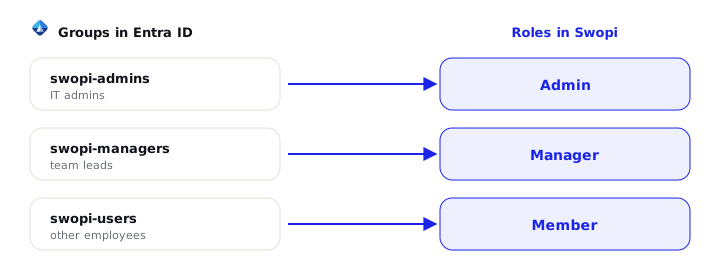
images/swopi-group-role-mapping.png
Swopi Teams is billed per active member with a business card. The Support (Service Desk) role is intended for people who only administer Swopi to support their colleagues and do not use a business card themselves:
- they have admin-level administrative permissions,
- they do not have their own business card,
- they do not count toward paid seats.
Just map them to the Swopi.Support App Role (or the Support group). Details are
in the Licensing and seats guide.
#What each role can do
For a full comparison of permissions, see the Roles and permissions guide.
#Troubleshooting
| Symptom | Cause and solution |
|---|---|
| A user has the Member role even though they have an admin App Role | The roles claim is missing, or the App Role value / Object ID does not match. Verify the assignment and the provided values. |
| A role change in Entra does not take effect immediately | The role is read at sign-in, the user must sign in again (or it happens during the pull sync). |
| An admin was demoted after a SCIM update | This should not happen: SCIM does not downgrade the role. If it occurred, verify that the role is not being changed manually in the dashboard. |
| Large number of groups → the role is missing | "Groups overage" switch to App Roles (the roles claim does not overflow). |
| The Service Desk counts toward seats | It is not mapped to the Support role. Assign Swopi.Support (or the Support group). |
Integration contact: support@swopi.co